What Is an Applicant Tracking System and How Does It Work?
An applicant tracking system, or ATS, is software that helps employers organize recruitment. It brings job postings, applications, resumes, interview details, candidate communication and hiring decisions into one system.
The purpose is not simply to scan resumes. An ATS gives recruiters a structured way to manage candidates from the time they apply until the vacancy is filled. Some platforms also include sourcing, onboarding, customer relationship management, timesheets, or payroll functions, but these are additional capabilities rather than standard features of every ATS.
Employers use different systems and configure them in different ways. One company may use its ATS mainly as an application database, while another may use it for automated screening, interview scheduling, approval workflows, and detailed recruitment analytics.
Understanding this difference is important for employers evaluating software and candidates preparing to apply. When comparing applicant tracking systems, HR professionals should consider criteria such as capacity to support growing teams, integration alongside existing HR or payroll software, ease of use for both recruiters and hiring managers, the ability to customize workflows, and the quality of reporting features. Security, data privacy controls, and vendor support are also important factors in selecting a system that fits company requirements.
An ATS Replaces Scattered Recruitment Records
Recruitment becomes difficult to control when resumes are stored in email accounts, interview notes are stored in spreadsheets, and hiring managers provide feedback in separate messages. Recruiters may struggle to identify the latest information or confirm who is responsible for the next action.
An ATS creates a central record for each job and candidate. That record may include:
- The vacancy and job description
- Application form and original resume
- Parsed resume information
- Screening answers
- Recruiter notes
- Interview schedules
- Hiring-manager feedback
- Assessment results
- Candidate communication
- Offer or rejection status
- Application source
- Consent and retention details
Workday defines an applicant tracking system as a central database that enables employers to post vacancies, collect applications, screen candidates and guide hiring teams through a consistent evaluation process.
Centralization does not guarantee a sound hiring decision. It makes the information and activity behind that decision easier to find, review and manage.
The Recruitment Process Starts with an Approved Vacancy
The employer usually creates a job record before receiving applications. Depending on the system, this may include the job title, location, department, employment type, responsibilities, required skills, salary range, and approval details.
Once the vacancy is approved, recruiters can publish it across:
- The employer’s career site
- Selected job boards
- Internal job portals
- Social recruitment channels
- Staffing or vendor platforms
Some systems allow recruiters to publish a vacancy across multiple connected channels without having to enter the same information repeatedly. This can save administrative time and keep the job title, description, and closing date more consistent.
The employer still needs to review how the advertisement appears on each platform. Fields, formatting, screening questions, and location settings may not transfer in the same way. To avoid errors or inconsistencies, HR professionals should always preview the published job posting on every board and channel where it appears. This includes checking that essential details are present, formatting is consistent, and any screening or mandatory application questions display correctly. A helpful tip is to submit a test application or ask a colleague to do so, as this can reveal if required information is missing or misaligned. Taking a few minutes to review each listing reduces the risk of confusion for candidates and of missed applications.
“One-click posting” also does not mean that every job board is automatically included. Recruiters should confirm which integrations are available, whether external accounts are required, and whether the job board charges a separate posting fee.
Applications Are Collected and Converted into Searchable Records
When a candidate applies, the ATS stores the application against the relevant vacancy. Many systems also use resume-parsing technology to extract details such as:
- Name and contact information
- Job titles
- Employers
- Employment dates
- Education
- Certifications
- Skills
- Languages
- Location
The extracted information is placed into searchable fields. This allows a recruiter to search for candidates with a particular skill, qualification, or type of experience without opening every resume individually.
Parsing is useful, but it is not always accurate. Tables, graphics, unusual layouts, text boxes, and scanned documents can affect how information is extracted. Employers should retain the authentic resume and allow recruiters to examine it before making a final decision.
A parsing error should not become evidence that the candidate lacks a qualification. It may simply mean the system did not interpret the document correctly.
Screening Works Differently from One Employer to Another
Every company uses no single ATS algorithm. Systems differ, and employers configure them according to their own hiring processes.
An ATS may help recruiters review applications through:
- Knockout questions
- Required qualification checks
- Keyword searches
- Location or work-authorization filters
- Recruiter-defined screening rules
- Match scores
- Manual resume review
- AI-supported recommendations
Some employers use basic filters to remove applications that do not meet essential requirements. For example, a role may legally require a professional license, or the employer may be unable to sponsor a work visa. Other organizations may conduct broader searches and allow recruiters to evaluate transferable experience manually.
A match score is also not a hiring decision. It reflects the data, rules and criteria used by the system. Poorly defined requirements can produce poor recommendations, even when the software performs as designed.
The CIPD advises employers to compare automated screening results with manual review and examine whether keywords, work gaps, postcodes or other criteria might unfairly exclude qualified candidates.
An ATS Tracks Candidates Through Each Hiring Stage
After the initial review, recruiters move suitable candidates through a series of stages. A typical process may include:
- Application received
- Recruiter review
- Telephone or video screening
- Hiring-manager review
- First interview
- Skills assessment
- Final interview
- References or background checks
- Offer
- Hired or closed
An ATS records the candidate’s current stage and can assign tasks to the appropriate recruiter, interviewer or manager. It may also send reminders when feedback or approval is overdue.
The workflow must match the role. A high-volume customer-service vacancy may require fewer stages than an executive, technical, clinical or security-sensitive position.
Moving every candidate through the same unnecessary steps can make the process slower rather than more controlled. Employers should configure separate workflows where the recruitment requirements genuinely differ.
Keep Candidate Communication and Interview Scheduling in One Place
Candidate communication often becomes fragmented when recruiters use individual email accounts. A candidate may receive duplicate interview invitations, miss an important update, or contact someone who is unaware of the current status.
An ATS may connect email templates, interview schedules, and status notifications to the candidate’s record. Common messages include:
- Application acknowledgements
- Requests for further information
- Interview invitations
- Assessment instructions
- Reminders
- Rejection messages
- Offer-related communication
Automation can reduce routine work, but each automated message should be reviewed and tested before it is activated. Before it goes live. Recruiters must check when it will be sent, whether the wording matches the candidate’s current stage, and whether another automated message could create confusion.
Candidates who have completed several interviews should not necessarily receive the same generic rejection sent after initial screening. Automation should make communication more reliable without removing appropriate human attention.
Employers Use ATS Software for Different Operational Reasons
The main value of an ATS comes from control over recruitment information and activity. Depending on the organization, it may help teams:
- Maintain one record for each job and candidate.
- Reduce repeated data entry.
- Coordinate recruiters and hiring managers.
- Search previous applications
- Schedule interviews
- Record feedback and decisions
- Track delayed actions
- Compare candidate sources
- Maintain recruitment records
- Manage candidate communication
- Produce operational reports
An ATS can reduce administrative work, but the result depends on implementation. Putting an unclear recruitment process into software does not make it clearer. It may simply automate confusion. To avoid this, employers should map out their current recruitment process in detail before adopting an ATS. Creating a visual or documented process map helps clarify current workflows, identify inefficiencies, and ensure that the new system supports, rather than complicates, how recruitment tasks are handled.
Before introducing an ATS, employers should define who approves vacancies, reviews applications, schedules interviews, records feedback, and communicates decisions.
Large Organizations Need Scale, Permissions and Consistent Reporting
Large employers may recruit across several departments, locations and countries. Their ATS requirements usually go beyond receiving resumes.
They may need:
- Different approval paths for each department
- Separate workflows for high-volume and specialist recruitment
- Role-specific access permissions
- Integration with HR and onboarding systems
- Regional privacy and retention settings
- Multiple languages
- Vendor and agency access
- Detailed activity records
- Standard leadership reports
- Support for large application volumes
Permissions require particular attention. A hiring manager should generally see the candidates relevant to their vacancy without gaining unrestricted access to every applicant in the organization. HR professionals should also take privacy into account, best practices, and data protection compliance, such as GDPR or other territorial regulations, when setting permissions. Proper access controls help secure sensitive candidate information and reduce legal and reputational risks.
Large organizations also need consistent definitions. If one team classifies a candidate as “shortlisted” after resume review while another uses the same label only after an interview, company-wide reporting will be unreliable.
Staffing Agencies Need to Track Candidates, Clients and Submissions
Recruitment agencies work with several clients at the same time. They must manage candidates and vacancies while also recording client contacts, submissions, ownership and feedback.
A staffing-focused ATS may therefore include:
- Client and contact management
- Job-order tracking
- Candidate ownership
- Submission history
- Client-specific workflows
- Vendor management
- Recruiter activity reports
- Candidate availability
- Bench or redeployment records
- Timesheets and invoicing
- Placement and revenue reporting
Agencies also need to prevent duplicate submissions. If two recruiters send the same candidate to the same client without checking the record, it can create confusion about ownership and damage the agency’s credibility.
The ability to search previous resumes is especially useful for agencies, but stored profiles must remain accurate. Recruiters should confirm the candidate’s current experience, location, availability, and interest before presenting an older record to a client.
An ATS Does Not Replace Professional Recruitment Judgment
An ATS can automate many recruitment tasks, but it cannot manage the entire hiring process or replace informed human judgment. The system can organize applications, apply predefined rules, and automate regular actions. It cannot independently decide what the organization genuinely needs or understand every candidate’s career in context.
Recruiters still need to:
- Clarify unclear job requirements.
- Assess transferable skills
- Interpret career changes and job gaps.
- Conduct organized interviews
- Review assessment evidence
- Provide appropriate adjustments
- Check possible screening errors.
- Communicate with candidates
- Make accountable hiring recommendations.
Human involvement should not begin only in the final interview. Recruiters need to review how screening rules behave and examine whether qualified applicants are being excluded for reasons unrelated to the job.
Technology can support consistency, but fairness depends on the criteria and decisions used within the system.
Candidates Do Not Need to “Beat” the ATS
The phrase “beat the ATS” creates the impression that all applications face the same hidden test. In reality, ATS platforms and employer settings vary widely.
A candidate’s goal should be to make genuine qualifications easy for both the software and the recruiter to identify. That means presenting relevant experience clearly rather than attempting to manipulate a score.
A practical ATS-compatible resume should:
- Follow the employer’s application instructions.
- Use familiar headings such as Professional Experience, Education and Skills.
- Include relevant terminology from the vacancy when it accurately reflects the candidate’s background.
- Present job titles, employers and dates clearly
- Use text rather than placing essential information inside images.
- Avoid excessive graphics, decorative text boxes and complex tables
- Spell out an important term before using its acronym.
- Use the requested file format.
- Include accurate evidence of responsibilities and achievements.
Harvard’s Mignone Center for Career Success recommends basic formatting, clearly stated skills, and job-description keywords used in context.
Keyword use should remain honest. Repeating a term several times does not compensate for a lack of experience, and using hidden keywords in a document is misleading. A recruiter may also reject an application after reading the resume, even if the system initially identifies it as relevant.
Simple Formatting Should Not Mean Weak Writing
An ATS-compatible resume can still be well written and professionally presented. The aim is to make the document easy to read rather than remove all structure or personality.
Candidates have to prioritize:
- A clear professional headline or summary
- Relevant skills supported by experience
- Concise responsibility and achievement statements
- Logical section order
- Consistent dates and formatting
- Appropriate spacing
- Standard, readable fonts
- Verified figures only
Avoid sending a scanned image as a resume unless specifically requested. A text-based PDF or DOCX file is generally easier to process, but the employer’s stated format should always take priority.
Candidates can also copy the resume text into a plain-text editor to check whether the content appears in a sensible order. This is not a perfect ATS test, but it may expose information hidden inside graphics or badly structured layouts.
Candidate Information Requires Proper Protection
An ATS can contain resumes, contact information, interview notes, assessment scores, salary expectations, and background-check results. Some of this information may remain in the system after the vacancy closes.
Employers should establish:
- Which candidate information is collected
- The purpose for collecting it
- Who can access it
- Whether it is shared with service providers
- How long the organization will retain the candidate’s information
- How candidates can exercise relevant rights
- When records will be erased or anonymized
- How security incidents will be handled
Access should be removed when recruiters, managers, or vendors change responsibilities or leave the organization. Retention periods should reflect legal requirements and genuine business needs rather than a default decision to store every application indefinitely.
A cloud platform does not automatically guarantee security. Employers should verify encryption, authentication, access permissions, activity logs, backups, hosting arrangements and incident-response procedures before importing candidate records.
Select an ATS Based on the Actual Hiring Process
A lengthy feature list is less useful than a system that resolves the organization’s recurring recruitment problems.
Before choosing an ATS, employers should determine:
- How many people will use it?
- Which vacancies and application volumes it must handle
- Whether staffing or client-management functions are required
- Which job boards and career sites must connect
- Whether interview scheduling is needed
- Which reports managers use
- What access restrictions apply
- Whether data must remain in a particular location
- Which HR, payroll or background-check systems must integrate
- What training and implementation support is available
- How candidate records can be migrated, exported and deleted
- What the complete cost will be
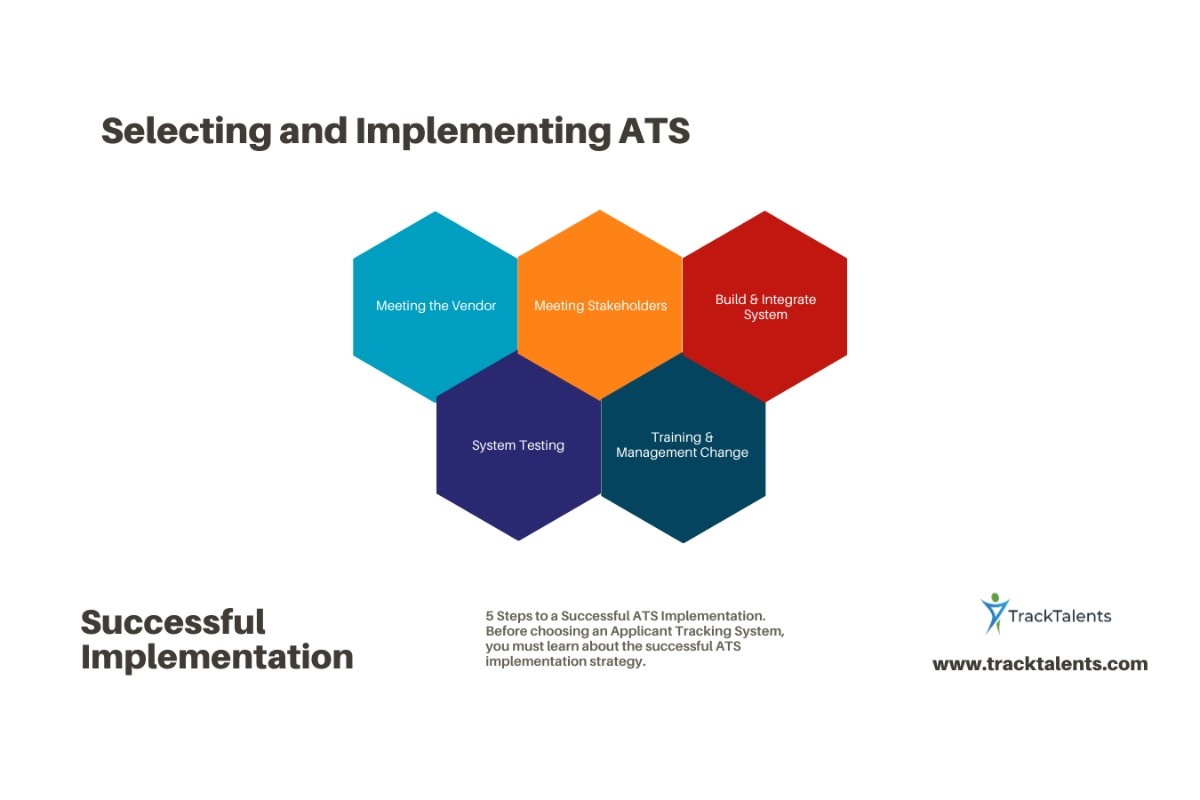
Test the system with a realistic vacancy and several sample candidate profiles, involving the recruiters and hiring managers who will use it regularly. A vendor-led demonstration alone may not show how well the software supports your organization’s actual recruitment process.
A simple test plan can make pilot testing more effective and help ensure successful adoption. Consider the following step-by-step approach:
1. Identify key end users who will regularly interact with the system, such as recruiters, hiring managers, and HR administrators.
2. Set up the ATS with a realistic job posting and workflow that fits your usual hiring process.
3. Create several dummy candidate profiles that reflect the range of applicants you typically see.
4. Have end users work through each recruitment stage, including application review, screening, interview scheduling, feedback entry, and communication.
5. Simulate common scenarios, such as multiple roles, different approval chains, or high application volumes.
6. Collect feedback from all participants on usability, workflow fit, and any problems or gaps encountered.
7. Review how well the system generates the required reports and supports data and privacy requirements.
This well-structured test helps surface real-life challenges early, increases team confidence, and promotes successful system adoption.
Where TrackTalents Fits into the Recruitment Process
TrackTalents is a cloud-based applicant tracking system designed for recruiters, staffing agencies, and HR teams. According to the company’s official features page, the platform provides:
- Job creation and posting
- An integrated career portal
- Resume parsing and bulk upload.
- Candidate, contact and vendor records
- Email templates and communication tracking
- Interview scheduling
- Custom workflows
- Onboarding and e-signatures
- Timesheets, invoicing and payroll-related functions
- QuickBooks integration
- Cloud storage and authenticated access
These capabilities go beyond the basic function of storing applications. The CRM, vendor, and timesheet features may be particularly relevant to staffing firms that manage candidates, clients, and placed workers in a single operating environment.
Prospective users should still verify which job boards, integrations, and security controls are available within the relevant plan and location. They should also test parsing accuracy, user permissions, reports, workflow configuration, and data export before transferring live candidate information.
TrackTalents currently advertises a 14-day free trial. Employers can use the trial to run a controlled test with dummy candidate records and verify if the system mirrors their recruitment process.
Use the ATS to Organize Decisions, Not Make Them Invisible
An applicant tracking system can reduce administrative work, consolidate candidate records, and show where each application stands. It can also help employers coordinate job postings, communication, interviews, and reporting across multiple vacancies.
Its value depends on what happens behind the interface. Clear requirements, relevant screening criteria, trained recruiters, consistent status definitions, and responsible data administration remain essential.
Employers should use an ATS to make recruitment activity easier to follow and decisions easier to explain. Candidates, meanwhile, should focus on a clear and accurate resume that connects their genuine experience to the role. Neither side benefits when the system is treated as a substitute for knowledgeable human decision-making.